channel-deflection-Cloud Contact Center​

แก้ปัญหาการรอสายนานในระบบ Cloud Contact Center

โดยส่วนใหญ่ปัญหาที่เจอการให้บริการของระบบ Call Center เมื่อมีลูกค้าติดต่อเข้ามาเป็นจำนวนมาก หรือจำนวนพนักงานรับสายไม่เพียงพอ คือ ลูกค้าต้องรอสายเป็นเวลานานจนลูกค้าที่ติดต่อเข้าต้องวางสาย ซึ่งทำให้เกิด Abandon call ขึ้น และทำให้มีผลกรทบกับการให้บริการ

วิธีแก้ไขเพื่อไม่ให้ลูกค้ารอสายเป็นเวลานาน ตัวอย่างเช่น

  1. Call Back option – เปิดทางเลือกให้ลูกค้าสามารถเลือกได้จะที่ให้ระบบติดต่อกลับเมื่อมีพนักงานว่างและยังคงอยู่ในคิวอยู่
  2. Call deflection option – เปิดการใช้งานที่ให้สลับช่องทางการติดต่อเพิ่มทาง Chat ซึ่งสามารถช่วยให้สามารถติดต่อไปยังพนักงานได้รวดเร็วขึ้น

จากทั้ง 2 ตัวอย่างที่กล่าวมา เราสามารถเปิดการใช้งานได้ในระบบ Amazon Connect ได้โดยวิธีการต่อไปนี้

  1. เปิดการใช้งาน Queue Call Back 

    • สามารถกำหนดได้จาก call flow ได้เลยผ่าน Block function Queue
  2. เปิดการใช้งาน Call Deflection
    • สามารถทำตามตัวอย่างใน Diagram ข้างล่างนี้ได้เลย ดูรายละเอียดได้จาก link นี้
    •  


หากมีข้อสงสัยหรือต้องการให้ช่วยเหลือการติดตั้งสามารถติดต่อได้ที่ Email : info@workscreation.com


check-connect-instance-type

วิธีตรวจสอบประเภทการ Authentication ของ Amazon Connect Instance

การตั้งค่าการยืนยันตัวตน (Authentication) เป็นขั้นตอนสำคัญในการจัดการ Amazon Connect instance เพื่อให้มั่นใจว่าผู้ใช้งานสามารถเข้าถึงระบบได้อย่างปลอดภัยและสอดคล้องกับนโยบายขององค์กร หลายคนที่ใช้งาน Amazon Connect อาจต้องการทราบว่า instance ที่ใช้งานอยู่มีการตั้งค่าการยืนยันตัวตนอย่างไร บทความนี้จะแนะนำวิธีการตรวจสอบว่า Amazon Connect instance ของคุณใช้การ authentication แบบไหนอย่างละเอียด

วิธีการตรวจสอบ Authentication ของ Amazon Connect Instance
  1. เข้าสู่ระบบ AWS Management Console

    • เปิด AWS Management Console และล็อกอินด้วยบัญชี AWS ของคุณ เพื่อให้สามารถเข้าถึงบริการต่างๆ ได้
  2. เปิด Amazon Connect

    • เมื่อเข้าสู่ระบบ AWS Management Console แล้ว ให้ค้นหา “Amazon Connect” ในแถบค้นหาด้านบน หรือเลือกจากบริการของ AWS
    • เมื่อพบ Amazon Connect ให้คลิกเข้าไปเพื่อเข้าสู่หน้าแดชบอร์ดของ Amazon Connect
  3. เลือก Amazon Connect Instance

    • ในหน้าแดชบอร์ดของ Amazon Connect จะมีรายชื่อ instance ที่คุณสร้างไว้ ให้เลือก instance ที่คุณต้องการตรวจสอบการตั้งค่า
    • คลิกที่ชื่อ instance นั้นเพื่อดูรายละเอียดเพิ่มเติม
  4. เข้าไปยังส่วน Settings ของ Instance

    • เมื่อเข้าสู่หน้า overview ของ instance ที่เลือกแล้ว ให้คลิกที่ปุ่ม “View details” เพื่อเข้าสู่หน้า Settings ของ instance นั้น
  5. ตรวจสอบ Identity Management

    • ในหน้า Settings จะมี section ที่ชื่อว่า “Identity management” ซึ่งจะแสดงวิธีการ authentication ที่ถูกตั้งค่าไว้สำหรับ instance ของคุณ โดยมีรายละเอียดดังนี้:

    • Store users within Amazon Connect: หากแสดงข้อความนี้ หมายถึง instance ของคุณใช้การจัดการผู้ใช้งานภายใน Amazon Connect เอง คุณสามารถสร้างและจัดการผู้ใช้ได้จาก Amazon Connect โดยตรง

    • SAML 2.0-based authentication: หากแสดงว่าใช้ SAML 2.0-based authentication นั่นหมายถึง instance ของคุณถูกตั้งค่าให้ใช้ Single Sign-On (SSO) ผ่าน SAML คุณสามารถเชื่อมต่อกับผู้ให้บริการ Identity Provider (IdP) เช่น Okta, Microsoft Azure AD เป็นต้น เพื่อให้ผู้ใช้สามารถล็อกอินด้วยระบบ Single Sign-On ขององค์กร

    • Link to an existing directory: หากแสดงข้อความนี้ หมายถึง instance ของคุณเชื่อมต่อกับ AWS Directory Service (Microsoft AD หรือ Simple AD) ซึ่งใช้เพื่อจัดการการยืนยันตัวตนของผู้ใช้งาน

  6. ดำเนินการเพิ่มเติม (ถ้าจำเป็น)

    • หลังจากที่ทราบประเภทของการ authentication ที่ใช้แล้ว คุณสามารถตั้งค่าและบริหารจัดการผู้ใช้ภายใน Amazon Connect ตามความต้องการขององค์กร เช่น เพิ่ม/ลบผู้ใช้งาน เปลี่ยนแปลงสิทธิ์การเข้าถึง หรือตั้งค่าการเชื่อมต่อกับระบบ IdP อื่นๆ


thailand-connect-number-porting

จะใช้เบอร์โทรศัพท์ที่มีอยู่แล้วกับ Amazon Connect ต้องทำอย่างไร

หลายท่านอาจะมีข้อสงสัยว่าจะใช้เบอร์เดิมที่มีอยู่แล้วกับ Amazon Connect ต้องทำอย่างไรบ้าง Blog นี้จะมาบอกขั้นตอนการย้ายเบอร์ให้ทราบ

โดยลำดับขั้นตอนการย้ายเบอร์จะเป็น

  1. ทำการเปิด Ticket support ผ่านทาง AWS ในหน้า AWS Console และเลือกหัวข้อเป็น number porting หลังจากนั้นให้ใส่หลายละเอียดของการขอย้ายเบอร์ เช่น ระบุเบอร์ที่ต้องการจะย้าย จำนวนคู่สายและประเภทของเบอร์โทรศัพท์ (E1 หรือ SIP Trunk)
  2. รอการยืนยันจาก AWS support ว่าสามารถดำเนินการย้ายเบอร์ได้หรือไม่ ถ้าสามารถย้ายเบอร์ได้ ทาง AWS support จะส่งเอกสารให้กรอกและข้อเอกสารยืนยันการเป็นเจ้าของเบอร์ที่เราจะทำเรื่องย้าย และเซ็นเอกสารส่งกลับ
  3. เมื่อ AWS Support ตรวจสอบเอกสารเสร็จเรียบร้อยแล้วจะแจ้งผลกลับมาว่ามีค่าใช้จ่ายเรื่องการย้ายเบอร์หรือไม่
  4. หลังจากที่ยืนยันยอมรับค่าใช้จ่ายเรื่องการย้ายเบอร์จะมีการแจ้งตอบกับมาในส่วนของ วันเวลาที่จะทำการย้ายเบอร์มาที่ AWS ซึ่งอาจจะใช้ระยะเวลาประมาณ 2-4 สัปดาห์ และช่วงการย้ายเบอร์จะมี traffic down ประมาณ ​1 ชั่วโมง

หากต้องการช่วยเหลือการ Setup Amazon Connect สามารถติดต่อได้ทาง Email : info@workscreation.com

amazon-connect-request-phone-number

ขั้นตอนการขอเบอร์โทรศัพท์ใช้กับ Amazon Connect

เราจะมาอธิบายขั้นตอนที่จะขอเบอร์โทรศัพท์ใหม่ใช้งานให้กับ Amazon Connect ต้องทำอย่างไร ก่อนอื่นเลยเราจำเป็นต้องสร้าง Amazon Connect Instance ขึ้นมาก่อนผ่านทาง AWS Consoles หลังจาสร้าง Amazon Connect Instance เสร็จเรียบร้อยแล้ว การขอเบอร์โทรศัพท์ (DID) นั้นเพื่อให้ใช้งานได้ต้องทำการเปิด Ticket ผ่านทาง AWS support ซึ่งต้องเปิด 2 ไป Ticket คือ

  1. Ticket สำหรับขอเบอร์โทรศัพท์ ( DID )
  2. Ticket สำหรับการขอให้สามารถโทรออกได้

Note : โดย Default จะไม่ได้อนุญาติให้โทรออกได้ จะโทรเข้าได้อย่างเดียว ถ้าต้องการให้โทรออกให้ได้ต้องเปิด Ticket ระบุว่ามีประเทศไหนบ้างที่เราต้องการโทรออก

สามารถดูตัวอย่างขั้นตอนการขอเบอร์และขอ whitelist โทรออกจากวิดีโอข้างล่างนี้ได้เลย

หลังจากเปิด Ticket เสร็จเรียบร้อยแล้วจะมี 2 Ticket ซึ่งขั้นตอนถัดไปจะเป็นการส่งเอกสารในการขอเบอร์ โดยจะได้รับ link ในการ upload ไฟล์เอกสารจากทาง AWS support และมีขั้นตอนการ upload แนบมาด้วย เอกสารที่เราต้องใช้ในการขอจะมีตามนี้ครับ

  1. เอกสารการจดทะเบียนธุรกิจ หรือ หลักฐานแสดงที่อยู่ธุรกิจ
  2. บัตรประชาชนหรือหนังสือเดินทางของผู้มีอำนาจ
ระยะเวลาการขอเบอร์โดยเฉลี่ยจะใช้เวลาไม่เกิน 1 เดือนขึ้นอยู่การ response กับ AWS support ทีม
 
Note : แนะนให้ขอไปหลายๆเบอร์ก่อนแล้วค่อยเลือกเบอร์ที่จะใช้ ส่วนเบอร์ที่ไม่ใช้เราสามารถเลือกยกเลิกได้

amazon-connect-telephony

ทำให้เบอร์โทรศัพท์ที่มีอยู่ต่อกับ Amazon Connect ได้อย่างไร

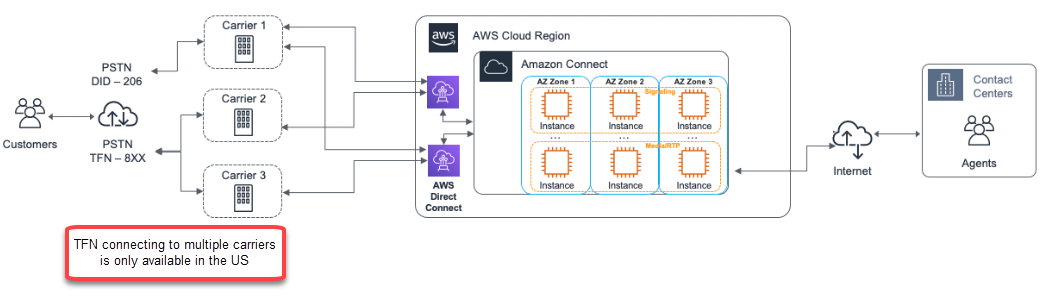
ก่อนที่จะทำการขอเบอร์โทรศัพท์ เราอาจจะรู้มาบ้างแล้วว่า Amazon Connect คืออะไร แต่บ้างคนอาจจะสงสัยว่าทำไมต้องขอ claim เบอร์ใหม่ หรือ ว่าจะใช้เบอร์เดิมที่อยู่ได้มั้ย ทั้ง 2 คำถามเป็นคำถามที่เจอบ่อยที่สุด และที่รู้กันคือ Amazon Connect เป็นระบบ Cloud contact center ที่เราจะไม่ต้องทำการดูแลเรื่องการเชื่อมต่อระบบโทรศัพท์กับ local telecom provider โดยที่ส่วนนี้เองทาง AWS จะเป็นคนดูแลให้ทั้งหมด ถ้าเราดูจากเอกสารอ้างอิงเรื่องระบบตามรูปข้างล่าง

Amazon Connect ไม่อนุญาติให้เราเอา Link ของสายโทรศัพท์ที่เรามีอยู่ไปเชื่อมต่อตรงเข้ากับ Service ได้ตรงๆ ไม่ว่าจะเป็นแบบ Sip Trunk หรือ E1 เลยเป็นสาเหตุให้เราต้องขอบริการผ่าน AWS support ในการขอเบอร์โทรศัพท์ให้ไปผูกกับตัว Amazon Connect service 

ส่วนวิธีการขอเบอร์หรือย้ายเบอร์เดิมไปที่  Amazon Connect ดูได้จากอีก Blog นึงครับ

ด้วยสาเหตุนี้ทำให้ Amazon Connect คง concept ที่เป็นระบบ cloud 100% ต่างจากยี่ห้ออื่นๆที่อยู่ในตลาดที่ยังต้องมีการดูแลหรือ setup ส่วนของ voice gateway เองอยู่

Sculptural Delights: Furniture Design Portfolio

This portfolio presents a series of innovative furniture designs that blur the lines between functionality and art. Each piece is a result of creative exploration, combining materials, forms, and textures to create furniture that is both practical and visually striking. The designs range from minimalist to complex, catering to diverse tastes and spaces.

The collection showcases the designer’s versatility and commitment to craftsmanship. Whether it’s a sleek, modern chair or an intricate, sculptural table, each design is a testament to the designer’s ability to reimagine the possibilities of furniture design.

Cutting-Edge Couture: Avant-Garde Fashion Design

This portfolio features a collection of avant-garde fashion designs that challenge conventional notions of beauty and style. Each design is a work of art, pushing the limits of imagination and creativity in fashion. The designer uses a mix of unconventional materials, bold colors, and experimental silhouettes to create striking couture pieces.

experimental silhouettes to create striking couture pieces. The collection is a testament to the designer’s artistic vision and technical expertise. It invites viewers to explore the boundaries of fashion and to appreciate the artistry involved in creating avant-garde apparel.

Urban Lens: Capturing the City’s Soul

This photography portfolio is a deep dive into urban landscapes, capturing the soul of the city through the lens. It features a collection of images that portray the city’s dynamic energy, architectural marvels, and the candid moments of its inhabitants. Each photograph is a narrative of the urban experience, showcasing the photographer’s ability to find beauty in the everyday.

The collection also explores the contrast between the bustling streets and the quiet, unnoticed corners of the city. It’s a celebration of urban life, highlighting the diversity, culture, and vibrancy that make each city unique.

Captivating Portraits: A Photographic Journey

This portfolio is a collection of portrait photographs that capture the essence of each subject. The photographer’s ability to connect with subjects, understanding their personalities and stories, is evident in each image. These portraits range from candid shots to carefully staged compositions, each telling its own story.

The collection showcases the photographer’s skill in using light, composition, and mood to reveal the unique character of each individual. It’s a celebration of human diversity and the art of portrait photography.

Revolutionary Runway: Breakthrough Fashion Shows

This portfolio presents a series of groundbreaking fashion shows that have redefined the runway experience. Each show is a display of creative vision, merging fashion with performance art. The portfolio captures the essence of these shows, from the innovative designs on display to the dynamic choreography and staging.

The collection not only showcases the garments but also the creative process behind staging a successful fashion show. It highlights the collaboration between designers, models, artists, and technicians in bringing a fashion vision to life.